Your guild
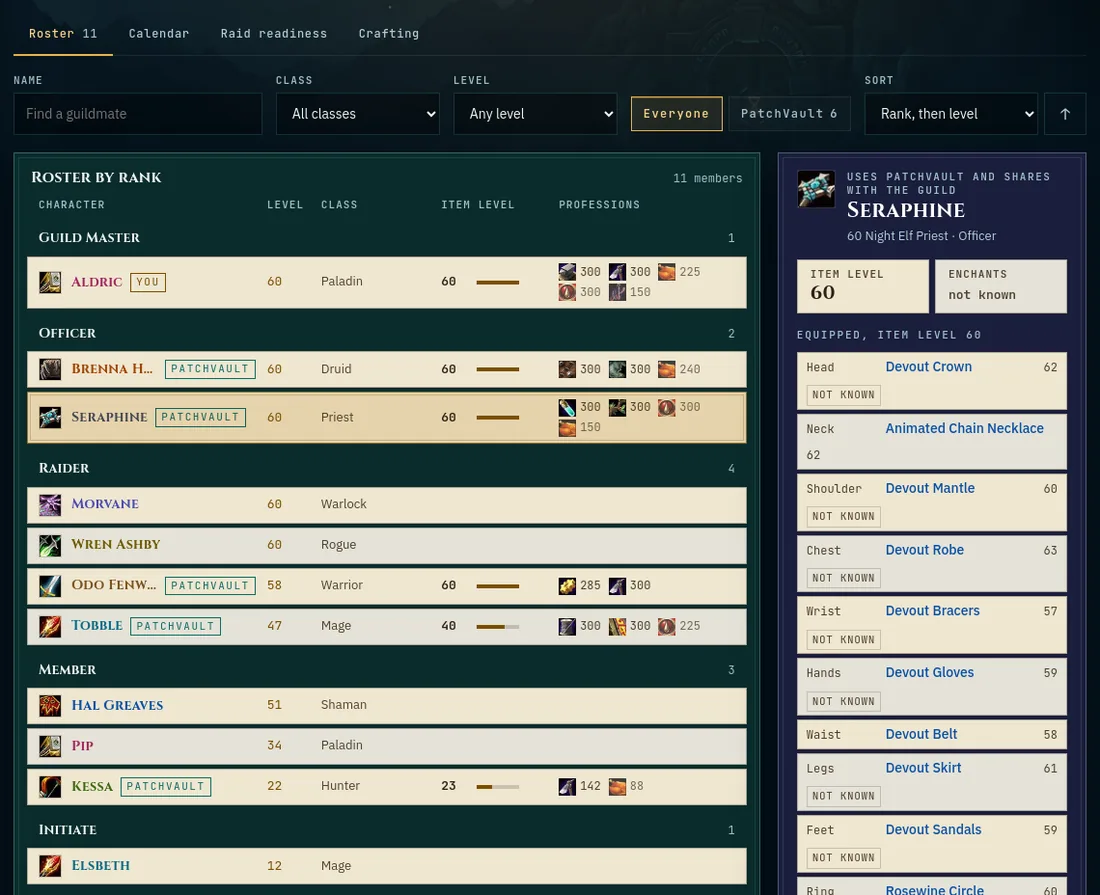
Guild shows the people in your WoW Forever guild who use PatchVault and chose to share, side by side. You need an account, the addon (version 1.14 or newer) and the desktop app.
How the site knows your guild
You do not type anything. A few seconds after you log in, the addon reads which guild your character is in, its rank, and the guild's member list as the game's Guild window shows it (names, ranks, levels and classes, never notes). The desktop app sends it at the next sync, or you paste the line from /pv while signed in (addon 1.22.3 and later).
A character only counts as a member once it is on the member list that another player's game sent. So:
- Only you so far means nobody else in your guild has synced with PatchVault yet. Ask them to install the addon and the desktop app.
- Not confirmed yet means others in the guild use PatchVault, but the lists they synced do not have you on them yet. It fixes itself the next time one of them logs in and syncs.
Nobody can join a guild on PatchVault by typing its name into a file. Leave the guild in game and you are out at the next sync.
Sharing
There are two levels. The basics are shared by default: confirmed guildmates see each of your characters' name, realm, level, class, race, rank, equipped gear with item levels and enchants, and profession ranks. Turn the basics off too at the bottom of the Guild page hides you completely.
Share everything with my guild adds reputation and recipes, so you show up under Crafting as well. Then tick the characters to show; a new alt joins by itself, and an unticked one is left out entirely. Stop sharing everything drops you back to the basics. Either way, never gold, bags, the bank, where you are, your email or your BattleTag. If you blocked someone in Messages (or they blocked you), you do not see each other here either.
The three views
- Roster: rank, level, class, item level and professions. Click a character for its gear and reputation.
- Raid readiness: item level and the reputations you pick, sortable, with a switch for the top level only.
- Crafting: type part of a recipe name to see who in the guild can make it, or click a character for all of their recipes.
All help topics. Still stuck? Send feedback.